The free VPN every app marketer should have (and the one way it gets you banned)
 Wajahat Karim
 On this page
If you are marketing an app with UGC videos, you have probably hit one of these walls. The AI video tool you want is not available in your country. You cannot see what is trending on US TikTok because your feed only shows you local content. Your commercial VPN keeps throwing captchas at every tool you log into.
You can fix all of that for free, permanently, with a server Oracle gives away and about 30 minutes.
But there is one thing you must not do with it, and almost every article on this topic gets it wrong. So read the next section before you build anything.
Quick answer: Oracle Cloud's Always Free tier gives you a server that runs forever at no cost. Install WireGuard on it and you get a private VPN with a dedicated IP that nobody else shares. Use it to unblock geo-restricted AI video tools and to research TikTok and Instagram trends in other countries. Do not log into or post from your real accounts through it, because cloud IPs are flagged as datacenter ranges.
What a self-hosted VPN actually fixes for app marketers
This is not a privacy post. Here is what it does for the actual job of pushing an app with UGC content.
It unblocks your creation stack. A lot of the good AI video and voice tools launch US-only, or gate features by region, or price differently by country. Same for TikTok Creative Center, ad libraries, and half the competitor research tools. A US IP makes those work.
It lets you research the market you are actually selling to. If your app targets the US and your feed is full of content from your own country, you are studying the wrong algorithm. Browsing TikTok and Instagram through a US IP, logged out or on a throwaway research account, shows you the formats and hooks that are working where your buyers are. Those hooks arrive in your local market weeks later. You want them now.
It is a clean IP that only you touch. This is the part people miss. A commercial VPN IP is shared by tens of thousands of users, which is why it is on every blocklist and why Stripe, Google and half the SaaS tools you use throw a verification challenge at you. Your Oracle IP is used by you alone. It is not clean because it is a cloud IP, but it is not poisoned by other people's behavior either.
It does not throttle your uploads. Always Free includes 10 TB of outbound transfer per month. If you are pushing dozens of videos a week, no commercial VPN plan gives you that headroom for free.
It costs nothing, forever. Not a trial. The Always Free tier stays free for the life of the account.
The part that gets accounts flagged
Here is the thing nobody selling you a VPN will tell you.
TikTok and Instagram do not just look at your IP. They look at who owns it. Every IP belongs to an ASN, and the ASNs of Oracle Cloud, AWS, Google Cloud and DigitalOcean are published, public information. Platforms keep lists of those ranges. Traffic that logs in or posts from a known datacenter range gets scored as automation before it does anything else.
So if you build this server and then start logging your money accounts into it and posting from it, you are not being clever. You are handing the platform the easiest possible signal that something is off. The usual result is not a dramatic ban. It is quieter than that: your reach drops, you get login challenges, you land in a verification loop, and you spend three weeks wondering why your views died.
TikTok also cross-checks more than the IP. The SIM registration on your device, your device language and locale, your payment country, and your posting history all feed the same risk score. An IP by itself does not outvote the rest. So the "change your region with a VPN" trick that VPN affiliate sites push is oversold at best.
| What you want to do | Use your own Oracle VPN? |
|---|---|
| Unblock a geo-restricted AI video or voice tool | Yes, this is the best use |
| Browse US TikTok or Reels to study trends and hooks | Yes, logged out or on a research account |
| Access competitor ad libraries and Creative Center | Yes |
| Get around your ISP throttling large uploads | Yes |
| Log into your real posting accounts | No |
| Post or schedule content to a real account | No |
| Run multiple accounts to look like different people | No, this needs mobile or residential proxies |
Post from your phone, on its normal connection, like a person. That is the boring answer and it is the one that keeps working.
Own VPN vs commercial VPN vs proxies
| Your own Oracle VPN | Commercial VPN | Residential / mobile proxy | |
|---|---|---|---|
| Cost | Free forever | 5 to 13 USD per month | 3 to 15 USD per GB |
| Who shares your IP | Nobody | Tens of thousands | A real household or SIM |
| IP type | Datacenter | Datacenter | Residential or mobile |
| Safe for account posting | No | No | This is what it is for |
| Good for tool access | Yes, best option | Often blocked | Overkill |
| Good for trend research | Yes | Yes | Yes |
| Setup effort | 30 minutes, once | Install an app | Account plus config |
| Bandwidth | 10 TB per month | Varies, often throttled | Metered, expensive |
Pick based on the job. For the creation and research side of UGC marketing, your own server wins on every line that matters. For the posting side, none of these beat a real phone on a real connection.
Before you start
- An Oracle Cloud account, free at cloud.oracle.com. You enter a card for verification; you are not charged for Always Free resources.
- A Mac, Windows or Linux machine to run a few commands.
- About 30 minutes.
Pick your home region carefully at signup. Oracle assigns a home region when your account is created and it cannot be changed later, and Always Free compute only runs in your home region. If you want a US IP for your tools and research, choose a US region during signup. Get this wrong and your only fix is a new account.
Part 1: Create the server
- Sign in at cloud.oracle.com
- Go to Compute → Instances → Create Instance
- Set it up:
- Name:
vpn-server - Image: Ubuntu 22.04 or 24.04
- Shape: VM.Standard.E2.1.Micro (this is the Always Free one)
- Networking: create a new VCN or use the default
- SSH keys: click "Generate a key pair" and download the private key. Save it to Downloads. You cannot download it again.
- Name:
- Click Create and wait for the instance to reach Running
If the instance page shows - for Public IPv4 address, assign one:
- Attached VNICs in the left sidebar, then click the VNIC name
- IPv4 Addresses under Resources
- The three-dots menu next to your private IP, then Edit
- Set Public IP Type to Ephemeral public IP, then Update
Write down the public IP. You will need it twice.
Part 2: Open the firewall
Oracle blocks everything by default, and this is where most people get stuck for an hour.
- Networking → Virtual Cloud Networks → your VCN
- Click your subnet, then its security list
- Add Ingress Rules
- Fill in:
- Source CIDR:
0.0.0.0/0 - IP protocol: UDP
- Destination port range:
51820
- Source CIDR:
- Save
Part 3: Connect over SSH
On Mac or Linux, open Terminal and run these, swapping in your key filename and your IP:
chmod 400 ~/Downloads/ssh-key-2026-01-01.key
ssh -i ~/Downloads/ssh-key-2026-01-01.key ubuntu@YOUR_PUBLIC_IP
Type yes when it asks about the fingerprint. You are in when the prompt says ubuntu@vpn-server:~$.
On Windows, use the same command in Windows Terminal, or use PuTTY.
Part 4: Install WireGuard and generate keys
Run this on the server:
sudo apt update && sudo apt upgrade -y
If a purple screen appears asking about restarting services, press Tab to select OK and hit Enter.
Then install WireGuard and make both key pairs in one go:
sudo apt install -y wireguard && \
wg genkey | sudo tee /etc/wireguard/server_private.key && \
sudo chmod 600 /etc/wireguard/server_private.key && \
sudo cat /etc/wireguard/server_private.key | wg pubkey | sudo tee /etc/wireguard/server_public.key && \
wg genkey | sudo tee /etc/wireguard/client_private.key && \
sudo cat /etc/wireguard/client_private.key | wg pubkey | sudo tee /etc/wireguard/client_public.key
You now have four keys. The server needs its own private key and the client's public key. The client needs the reverse. That is the whole model.
Never paste your private keys anywhere public. Not in a gist, not in a screenshot, not in a support thread. Anyone holding your client private key can use your VPN as you.
Part 5: Write the server config
Grab the three values you need:
sudo cat /etc/wireguard/server_private.key    # SERVER_PRIVATE_KEY
sudo cat /etc/wireguard/client_public.key     # CLIENT_PUBLIC_KEY
ip route get 8.8.8.8 | awk '{print $5; exit}' # INTERFACE_NAME, usually ens3
Open the config file:
sudo nano /etc/wireguard/wg0.conf
Paste this and replace the three placeholders:
[Interface]
Address = 10.0.0.1/24
ListenPort = 51820
PrivateKey = SERVER_PRIVATE_KEY
PostUp = iptables -A FORWARD -i wg0 -j ACCEPT; iptables -t nat -A POSTROUTING -o INTERFACE_NAME -j MASQUERADE
PostDown = iptables -D FORWARD -i wg0 -j ACCEPT; iptables -t nat -D POSTROUTING -o INTERFACE_NAME -j MASQUERADE

[Peer]
PublicKey = CLIENT_PUBLIC_KEY
AllowedIPs = 10.0.0.2/32
Save with Ctrl+O then Enter, exit with Ctrl+X.
Part 6: Turn on forwarding
Without this you connect fine and then have no internet. This is the single most common failure.
echo "net.ipv4.ip_forward = 1" | sudo tee -a /etc/sysctl.conf
sudo sysctl -w net.ipv4.ip_forward=1

sudo iptables -I INPUT -p udp --dport 51820 -j ACCEPT
sudo iptables -I FORWARD 1 -i wg0 -o ens3 -j ACCEPT
sudo iptables -I FORWARD 2 -i ens3 -o wg0 -m state --state RELATED,ESTABLISHED -j ACCEPT

sudo apt install -y iptables-persistent
sudo netfilter-persistent save
Note the -I flag, not -A. Ubuntu images on Oracle ship with a REJECT rule already sitting in the FORWARD chain, so appending puts your rules after it and they never fire. Inserting puts them on top. Swap ens3 for whatever your interface name was.
Part 7: Start it
sudo systemctl enable wg-quick@wg0
sudo wg-quick up wg0
sudo wg show
wg show should print interface: wg0 and your peer.
Part 8: Get your client config
Run this on the server:
echo "
[Interface]
PrivateKey = $(sudo cat /etc/wireguard/client_private.key)
Address = 10.0.0.2/24
DNS = 1.1.1.1

[Peer]
PublicKey = $(sudo cat /etc/wireguard/server_public.key)
Endpoint = YOUR_SERVER_PUBLIC_IP:51820
AllowedIPs = 0.0.0.0/0
PersistentKeepalive = 25
"
Copy the output and replace YOUR_SERVER_PUBLIC_IP with your actual IP.
For your phone, print it as a QR code instead:
sudo apt install -y qrencode
qrencode -t ansiutf8 "$(echo -e "[Interface]\nPrivateKey = $(sudo cat /etc/wireguard/client_private.key)\nAddress = 10.0.0.2/24\nDNS = 1.1.1.1\n\n[Peer]\nPublicKey = $(sudo cat /etc/wireguard/server_public.key)\nEndpoint = YOUR_SERVER_PUBLIC_IP:51820\nAllowedIPs = 0.0.0.0/0\nPersistentKeepalive = 25")"
Part 9: Connect your devices
Mac. Install WireGuard from the App Store. Open TextEdit, Format → Make Plain Text, paste the config, save it as vpn.conf. In WireGuard, Import tunnel from file, then Activate.
iPhone or Android. Install WireGuard from the App Store or Play Store, tap +, then either scan the QR code or create from scratch and paste the config.
Windows or Linux. Get WireGuard from wireguard.com/install, import the config, activate.
Then check it worked: connect, open ipinfo.io, and confirm the IP and city shown are your Oracle server's, not your home connection's.
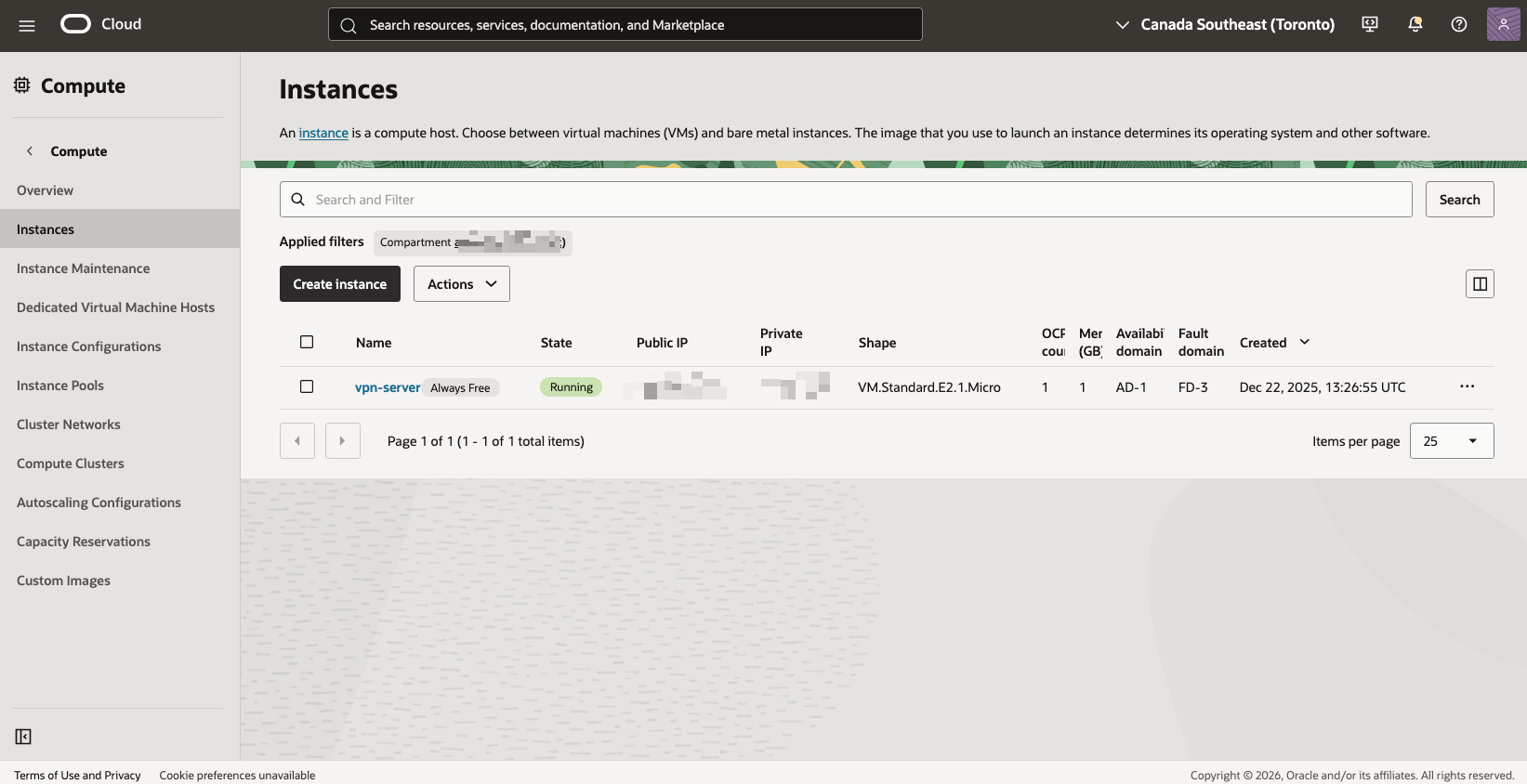
That is my actual server. Note the Always Free badge next to the name and the created date: it has been running since December 2025 and has never cost me anything.
Note the region too, because it matters and mine is not what this post tells you to pick. I am on Canada Southeast (Toronto), not a US region. It still does the job I built it for, and it is still a dedicated IP nobody else shares. But Canada is a different geo from the US for almost every tool that gates by country, so a Toronto IP will not unlock US-only launches and will not show you the US For You feed. If US-gated tools are your reason for building this, pick a US region at signup, because you cannot change it later.
When it does not work
WireGuard will not start. Bring it down and up again: sudo wg-quick down wg0 && sudo wg-quick up wg0. If it still fails, you almost certainly have a typo or a stray space in one of the keys in wg0.conf.
Connected but no internet. Check forwarding is on with cat /proc/sys/net/ipv4/ip_forward; it should print 1. Then check your rules are at the top of the chain with sudo iptables -L FORWARD -n -v. If they are below a REJECT rule, reapply them with -I instead of -A.
Cannot connect at all. Three things, in order: the Oracle security list has UDP 51820 open, sudo wg show says the interface is up, and your client config has the right server public key and endpoint IP.
It worked yesterday and not today. You probably stopped and started the instance and got a new ephemeral public IP. Leave the instance running, or reserve the IP in the Oracle console so it stays yours.
Adding more devices
Each device needs its own key pair, its own address and its own [Peer] block on the server. Generate a new pair, then add:
[Peer]
PublicKey = SECOND_DEVICE_PUBLIC_KEY
AllowedIPs = 10.0.0.3/32
Bump the address for each one: 10.0.0.3, 10.0.0.4, and so on. Never reuse a key pair across two devices; they will fight over the same tunnel.
Always Free also gives you two micro instances, so you can run a second server with a second IP if you want to keep your research browsing separate from everything else.
What it costs
Nothing, if you stay inside Oracle's Always Free limits:
- 2 x VM.Standard.E2.1.Micro instances
- 200 GB block storage
- 10 TB outbound transfer per month
A personal VPN barely dents any of it. Two things worth doing anyway: leave the instance running 24/7, since stopping it can cost you your IP, and set a 1 USD budget alert under Billing → Budgets so you hear about it immediately if anything ever starts billing.
The bottom line
A free server with a dedicated IP removes most of the friction in the UGC side of app marketing. Your tools work, you can see the market you are actually selling to, and nothing in your stack is throttled or shared with strangers.
Just keep the line clear in your head. This is infrastructure for making content and doing research. It is not a posting strategy. The accounts that grow are the ones that behave like a person with a phone, and no server changes that part.
What does change it is having other people to compare notes with, ship alongside, and steal formats from before they get saturated.
Frequently asked questions
Can I use a VPN to post on TikTok from another country?
You can, but not from a cloud server VPN like this one. TikTok and Instagram both check the ASN of your IP, and Oracle Cloud, AWS and DigitalOcean ranges are known datacenter ranges. Posting or logging into a real account from one is a fast way to get restricted. Use a VPN like this for research and for unblocking your creation tools, and post from your actual phone on its normal connection.
Will a VPN get my TikTok account banned?
A commercial or cloud VPN IP raises your risk a lot on a new account, because thousands of people share those IPs and platforms score them as suspicious. It is rarely a single instant ban. It usually shows up as reduced reach, a login challenge, or a verification loop. The safe pattern is to keep your posting accounts on their normal home connection.
Is Oracle Cloud actually free forever?
Yes, the Always Free tier is free for the life of the account, not a 30-day trial. It includes micro compute instances, 200 GB of block storage and 10 TB of outbound data transfer per month. A personal WireGuard VPN uses a tiny fraction of that. You still enter a card at signup for verification.
Which Oracle region should I pick for a US IP?
Pick a US region as your home region during signup. Oracle assigns your home region when the account is created and it cannot be changed afterwards, and Always Free compute only runs in your home region. If you want a US IP, choose a US region before you finish signing up.
How many devices can I connect to one WireGuard server?
As many as you want. Each device needs its own key pair, its own address like 10.0.0.3 or 10.0.0.4, and its own Peer block in the server config. There is no per-device charge because you own the server.
Why WireGuard instead of OpenVPN?
WireGuard is far smaller, faster to set up, and much faster on mobile. It reconnects almost instantly when you switch between Wi-Fi and mobile data, which matters when you are moving around uploading video all day. OpenVPN works too; it is just more configuration for no benefit here.
What is the difference between this and a residential or mobile proxy?
This gives you one dedicated datacenter IP that only you use. A residential or mobile proxy borrows an IP from a real consumer ISP or a real mobile carrier, which is what platforms trust for account activity. Your own VPN is better for research, tool access and privacy. Proxies are what people use for multi-account posting, and they cost money.
Do I need a static IP for this to work?
Your Oracle instance gets a public IP that stays with it as long as you leave the instance running. Stopping and starting an instance with an ephemeral IP can hand you a new address, which breaks your client config. Leave it running, or reserve the IP in the Oracle console so it is permanent.